Showing posts with label WEBADI. Show all posts

Monday, June 24, 2019

Migrating Web ADI template from one Instance to another

Following are the components that are associated to the Web ADI that can be migrated from one instance to another:


  • Integrators
  • Layouts
  • Mappings
  • Contents

Integrators:

Identify the Integrator to migrate as below,

select integrator_code, application_short_name
  from apps.bne_integrators_vl  bnv
      ,apps.fnd_application_vl  fav
 where bnv.user_name = &integrator_name
   and fav.application_id = bnv.application_id;

For the Integrators, you can

Download the Integrator:
FNDLOAD apps/$APPS_PASSWORD 0 Y DOWNLOAD $BNE_TOP/patch/115/import/bneintegrator.lct INTEGRATOR_LDTFILE.ldt BNE_INTEGRATORS INTEGRATOR_ASN="appl_short_name" INTEGRATOR_CODE="integrator_name"

Upload the Integrator:
FNDLOAD apps/$APPS_PASSWORD 0 Y UPLOAD $BNE_TOP/patch/115/import/bneintegrator.lct INTEGRATOR_LDTFILE.ldt

Layouts:

Identify the Layout to migrate as below,

select layout_code
  from apps.bne_layouts_vl
 where user_name = &integrator_name;

For the Above Layouts, you can 

Download the Layout:
FNDLOAD apps/$APPS_PASSWORD 0 Y DOWNLOAD $BNE_TOP/patch/115/import/bnelay.lct LAYOUT_LDT.ldt BNE_LAYOUTS LAYOUT_ASN="appl_short_name" LAYOUT_CODE="Layout_code"

Upload the Layout:
FNDLOAD apps/$APPS_PASSWORD 0 Y UPLOAD $BNE_TOP/admin/import/bnelay.lct LAYOUT_LDT.ldt

Mappings:

Identify the Mapping to migrate as below, 


select mapping_code
  from apps.bne_mappings_vl
 where integrator_code = &integrator_code

For the Above Mappings, you can,

Download the Mapping:
FNDLOAD apps/$APPS_PASSWORD 0 Y DOWNLOAD $BNE_TOP/patch/115/import/bnemap.lct MAPPING_LDT.ldt BNE_MAPPINGS MAPPING_ASN="appl_short_name" MAPPING_CODE="Mapping_code"

Upload the Mapping:
FNDLOAD apps/$APPS_PASSWORD 0 Y UPLOAD $BNE_TOP/admin/import/bnemap.lct MAPPING_LDT.ldt

Contents:

Identify the Contents to migrate as below,

select content_code
   from apps.bne_contents_vl
  where integrator_code = &integrator_code

For the Above Contents, you can 

Download the Contents:
FNDLOAD apps/$APPS_PASSWORD 0 Y DOWNLOAD $BNE_TOP/patch/115/import/bnecont.lct CONTENT_LDT.ldt BNE_CONTENTS CONTENT_ASN="appl_short_name" CONTENT_CODE="Content_code"

Upload the Contents:
FNDLOAD apps/$APPS_PASSWORD 0 Y UPLOAD $BNE_TOP/admin/import/bnecont.lct CONTENT_LDT.ldt

Friday, June 21, 2019

WEBADI Table Informations

Integrator

BNE_INTEGRATORS_B
BNE_INTEGRATORS_TL
BNE_INTEGRATORS_VL

Layout
BNE_LAYOUTS_B
BNE_LAYOUTS_TL
BNE_LAYOUTS_VL

Layout Columns
BNE_LAYOUT_COLS
BNE_LAYOUT_COLS_V

Mapping
BNE_MAPPINGS_B
BNE_MAPPINGS_TL
BNE_MAPPINGS_VL

Content
BNE_CONTENTS_B
BNE_CONTENTS_TL
BNE_CONTENTS_VL

Interface
BNE_INTERFACES_B
BNE_INTERFACES_TL
BNE_INTERFACES_VL

Register / Attach WEBADI Function to Responsibility in R12

Here the article will describe about how to register WebADI to Responsibility menu

Go to System Administrator --> Security --> Responsibility --> Define

Query the responsibility which want to register the WebADI, Get the menu name

Example

Responsibility Name : XXCDM Test Responsibility
Menu :  AP_NAVIGATE_GUI12

CREATE FUNCTION

Go to System Administrator --> Application  --> Function

Form Function Window

Enter value for Function and  User Function Name under Description


Example 

Function : XXCDM_WEBADI_SIMPLE
User Function Name : XXCDM Simple WebADI Integrator


Enter value for Type as "SSWA servlet function" under Properties


Under the Form tab

Paste the Parameter value as

bne:page=BneCreateDoc&bne:viewer=BNE:EXCEL2007&bne:reporting=N&bne:integrator=SQLAP:CDMXX_WEBADI_INTGR_XINTG&bne:layout=SQLAP:CDMXX_WEBADI_LO&bne:content=SQLAP:CDMXX_WEBADI_INTGR_CNT1&bne:noreview=Y

 Change the integrator_code, layout_code and content_code

SQLAP --> Application short name of Integrator, We can use application id instead of short name.

Execute the below query to get all details for your parameter.

SELECT biv.application_id
       ,biv.integrator_code
       ,biv.user_name
       ,bib.interface_code,lo.LAYOUT_CODE,
       (select user_name from BNE_LAYOUTS_TL whereLAYOUT_CODE=lo.LAYOUT_CODE) layoutname,
       (select user_name from BNE_CONTENTS_TL wherecontent_code=cont.content_code) contentname,
       cont.content_code,
       cont.param_list_code,
       cont.content_class,(SELECT QUERY FROM BNE_STORED_SQL WHERECONTENT_CODE=CONT.CONTENT_CODE)QUERY
   FROM bne_integrators_vl biv
       ,bne_interfaces_b   bib,
       BNE_LAYOUTS_B lo,
       BNE_CONTENTS_b cont
  WHERE upper(user_name) like '%your intergrator name%'
    AND bib.integrator_code = biv.integrator_code
    and lo.integrator_code = biv.integrator_code
    and cont.integrator_code = biv.integrator_code


Enter value for HTML Call as "BneApplicationService" under Web HTML

Save it


ATTACH FUNCTION TO MENU

Go to System Administrator --> Application  --> Menu

Query your menu,

Add one more row

Select the function name "XXCDM Simple WebADI Integrator" which we created now

put the same name for Prompt as well

Example : AP_NAVIGATE_GUI12


ATTACH FUNCTION TO WEBADI

Go to Desktop Integration Manager --> Query the Integrator Name --> select the update option

add the function name "XXCDM Simple WebADI Integrator"


Verify the Integrator


Calling a Concurrent Program - Web ADI


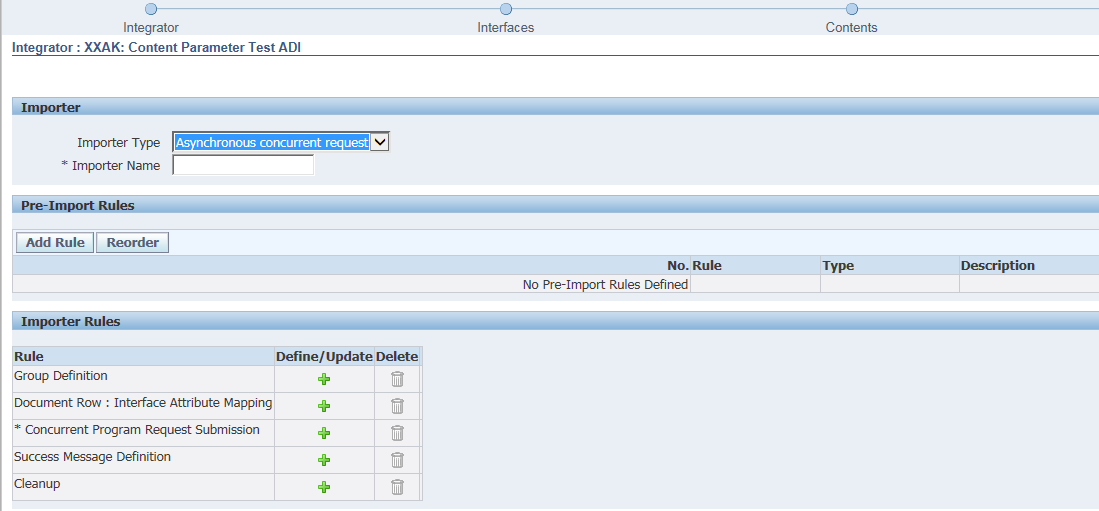
Calling a concurrent program can be achieved by defining an ‘importer’ during Integrator definition (Please follow other Web ADI posts for details).


There are three options to define an importer


Asynchronous concurrent request:
Here Integrator submits the specified concurrent program after completing the upload and returns the request ID to the user, but does not wait for the import program to complete. This importer type reduces the wait time by deferring the import process. However, you need to verify the concurrent program by your own. it is recommended that you define pre-import rules with this type to validate the data at the time of upload. If the pre-validation fails, then integrator returns an error message.

 Synchronous concurrent request:
Integrator submits the specified concurrent program after completing the upload, waits for the program to complete, and then returns the results to the user. This importer type gives users immediate feedback about the success of the import, but can increase the wait time.

 PL/SQL AP:
It is same as the Synchronous concurrent request, only difference is that it calls an API instead on concurrent request and partly reduces the time by bypassing the concurrent processing queue.

Here, I am using an Asynchronous Concurrent Request importer type.
“Asynchronous concurrent request” importer type allows:
-          Pre-Import Rules    - Optional                         
-          Group Definitions  - Optional
-          Document Row : Interface Attribute Mapping - Optional
-          Concurrent Program Request Submission  - Mandatory
-          Success Message Definition  - Optional
-          Cleanup - Optional

Pre-Import Rules:  These can be used to run a select statement or to run some PL/SQL.  We can define a pre-import rule in order to use a value from the spreadsheet as a parameter value in the concurrent program submission.

Rule can be based on :
SQL Query
PL/SQL API Function
PL/SQL API Procedure
Sequence


I am using SQL Query and taking benefit_name from the staging table.

* Please note that it always fetches the first row of the result.

Test your query and ‘Apply’

Provide the reference name so that you can refer this rule.
Group Definition:  It is needed when you want to process the records in a particular group. I am skipping it here.

Document Row : Interface Attribute Mapping: This rule type is required for asynchronous concurrent request importer and optional for other importer types. This is how we identify each row that may have a unique result. I am skipping it here.

Concurrent Program Request Submission - Specifies the concurrent program to perform the import. This rule type is required only for an asynchronous or synchronous importer type.
Select the specified concurrent program name and ‘Apply’

Please provide ‘Reference Name’ and any values you want. Here I am providing default value ‘NEW’ to p_status and the importer rule value to the benefit name.

Value source can be:
Environment Variables
Import
Import Table
Upload Parameters

‘Apply’

Success Message Definition: You can provide a message to display when the import process is submitted successfully.

Program 'XXAK: Content Parameter Test ADI Program' Submitted Successfully With Request ID: $import$.requestid
Please verify the status from concurrent request window.

‘Apply’
Cleanup - Specifies cleanup processing to perform if errors occurred during any of the previous importer rules. I am skipping it here.

‘Submit’

> Now It is time to test,  run the ADI
Insert a new row and ‘upload’

Note the request id returned

Check the request


*Parameter tag and value for import is bne:import=Yes or No
Yes: Program submitted automatically after the upload

FNDLOAD and WFLOAD Commands in Oracle applications

Below are  a list  of FNDLOAD and WFLOAD commands which are used to move FND object from one instance to another instance. FND OBJECT...